As-Built Drawings Explained: What They Show, When You Need Them and How They Are Produced
As-built drawings provide a measured record of what exists, rather than what was originally proposed. This guide explains what reliable as-built information should contain, how it differs from design and record drawings, when plans, sections and elevations are needed, and how survey methodology affects the finished deliverables.
- Define the intended use, coverage and level of detail before capture.
- Distinguish measured evidence from design information and reported changes.
- Plans, sections and elevations require interpretation and quality assurance.
TL;DR — What are as-built drawings?
- As-built drawings record what exists, rather than what was intended at design stage.
- They may describe an existing building, newly completed work, installed services or changes made during construction.
- A useful package can include plans, sections and elevations, supported by levels, dimensions, annotations and agreed asset information.
- Design drawings, construction drawings, record drawings and measured as-built drawings are related, but they are not interchangeable.
- Existing drawings should not be assumed correct merely because they are labelled “as built”.
- The required accuracy and level of detail should reflect the decisions that will be made from the information.
- 3D laser scanning can capture complex visible geometry efficiently, but the final drawings still depend on access, survey control, interpretation and quality assurance.
- As-built drawings record observed conditions within scope; they do not automatically certify compliance, workmanship, ownership boundaries or concealed construction.
Buildings rarely remain exactly as first designed.
Dimensions change on site. Openings move. Structure is adjusted. Services are routed around constraints. Later refurbishments add another layer of alteration, sometimes without a reliable drawing record.
As-built drawings provide a reference for the building or installation as it exists at the time of survey or completion.
That sounds straightforward. In practice, the term is used for several different kinds of information, produced at different stages and with very different levels of reliability.
Understanding those distinctions helps clients commission the right survey, avoid false confidence in inherited drawings and obtain information that is genuinely useful for design, coordination, operation or verification.
An as-built drawing is valuable because it reduces uncertainty about what is actually there—not because the words “as built” appear in the title block.
What are as-built drawings?
As-built drawings are drawings intended to represent completed or existing conditions.
Depending on the project, they may record:
- the geometry of an existing building before refurbishment;
- completed architectural or structural work;
- the installed position of mechanical, electrical or public-health services;
- changes made during construction;
- site features, levels and external works;
- dimensions needed for coordination, fabrication or future maintenance;
- the relationship between new work and retained fabric.
The format can range from marked-up construction drawings to a newly surveyed CAD or BIM record.
Those are not equivalent sources.
A contractor’s marked-up drawing may provide valuable information about changes made during construction. A measured survey records what can be observed and measured on site. A coordinated record model may combine site verification, design information, installation data and asset information.
The right approach depends on the intended use.
As-built drawings, record drawings and measured surveys: what is the difference?
Project teams often use these terms loosely, so the scope should be defined rather than inferred from the label.
Design drawings
Design drawings describe what is proposed. They support planning, coordination, approvals, pricing and construction, but they do not prove that the work was built exactly as shown.
Construction drawings
Construction drawings communicate the information used to build the works. They may be revised during delivery, but even the latest construction issue can differ from site conditions.
Marked-up as-built information
Site teams may annotate construction drawings to record changes. This can preserve knowledge that would otherwise be lost, particularly for concealed services or components.
Its reliability depends on how consistently changes were captured and checked.
Record drawings
Record drawings are the final project record assembled from design revisions, contractor information, surveys, commissioning data and other handover material. They can be comprehensive, but the term does not guarantee that every element was independently measured.
Measured as-built drawings
Measured as-built drawings are produced from a site survey of visible and accessible conditions. They provide independent evidence of geometry at a stated time.
For existing buildings, this is often what clients mean when they request “as builts”: an accurate set of drawings created from a measured building survey.
What should as-built drawings show?
The contents should follow the project requirement rather than a generic checklist.
A typical building package may include the following.
Floor plans
Plans can record:
- wall positions and thicknesses;
- columns, piers and structural features;
- doors, windows and openings;
- stairs, voids and changes in level;
- fixed fixtures and significant equipment;
- ceiling or overhead features where relevant;
- room names and use;
- principal dimensions and levels;
- service elements included within the agreed scope.
Sections
Sections explain vertical relationships that plans alone cannot show, including:
- floor-to-floor and floor-to-ceiling heights;
- roof forms;
- structural zones;
- stair geometry;
- level changes;
- openings and head heights;
- relationships between adjoining spaces;
- relevant plant, ductwork or service routes.
Elevations
Internal or external elevations may record:
- façade openings and architectural features;
- floor and parapet levels;
- external materials or construction changes where observable;
- wall-mounted equipment and services;
- internal fittings, sanitaryware or joinery;
- complex rooms where a plan is insufficient.
Additional outputs might include roof plans, reflected ceiling plans, streetscapes, topographical information, schedules, details, point clouds or a coordinated 3D model.
See Scan to CAD for the workflow from surveyed geometry to 2D plans, sections and elevations.
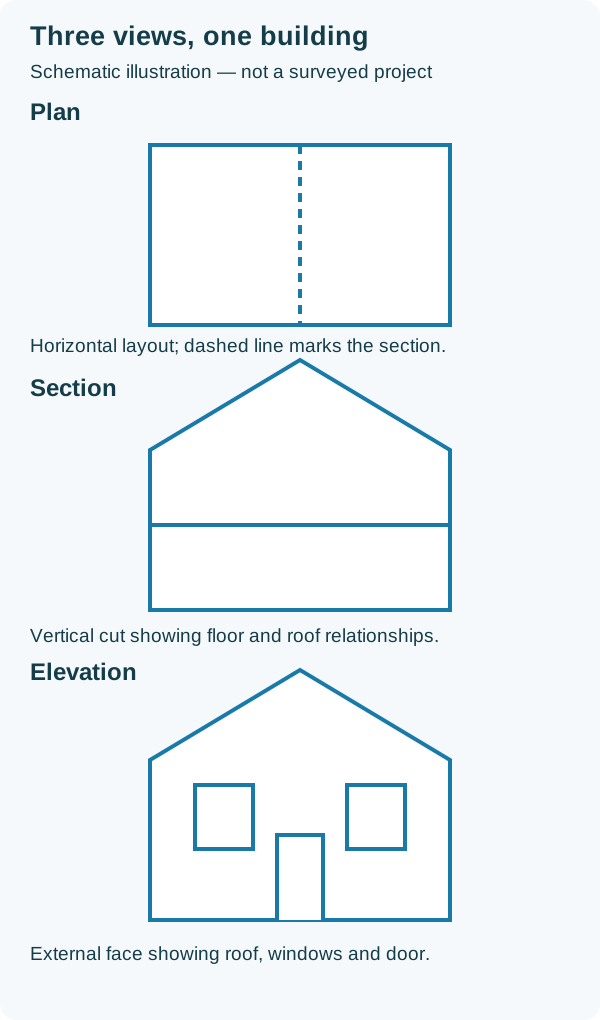
Schematic illustration of three complementary views; not a surveyed project or dimensioned drawing.
When are as-built drawings needed?
Reliable existing-condition information is useful whenever decisions depend on what is already present.
Common applications include:
- refurbishment and retrofit design;
- extensions and change of use;
- fit-out and landlord handover;
- structural alterations;
- façade replacement or remediation;
- MEP coordination and plant-room upgrades;
- space planning and area assessment;
- lease, acquisition and due-diligence work;
- facilities and asset management;
- verification of completed construction;
- future maintenance or alteration;
- heritage recording.
For refurbishment projects, early as-built information gives architects, engineers and consultants a shared geometric base. This reduces the risk of separate teams working from inconsistent assumptions.
For completed works, the drawings can form part of the handover record and support later maintenance—provided their source, scope and verification status are clear.
Why existing drawings should be treated carefully
A drawing may look precise while being unsuitable for the current decision.
Inherited drawings can be:
- based on the original design rather than completed work;
- incomplete or superseded;
- traced from an older source;
- distorted through repeated scanning or conversion;
- missing later alterations;
- accurate overall but unreliable in critical areas;
- drawn schematically rather than dimensionally;
- inconsistent between plans, sections and elevations.
The title “as built” is therefore evidence of intent, not proof of accuracy.
Existing information should be reviewed against its origin, date, purpose and revision history. Where risk matters, site verification is usually more dependable than assumption.
How are measured as-built drawings produced?
A reliable workflow normally includes more than a site visit and a CAD file.
1. Define the purpose
The team establishes how the information will be used.
Planning drawings, design coordination, fabrication, asset records and construction verification can require different levels of detail and checking.
2. Agree the survey extent
The brief should identify:
- buildings, floors and external areas to be covered;
- plans, sections, elevations or models required;
- visible services or specialist elements to include;
- required scale or level of detail;
- coordinate and datum requirements;
- critical dimensions or interfaces;
- access restrictions and known exclusions;
- file formats, naming and issue requirements.
3. Review existing information
Available drawings can help plan access, identify expected complexity and provide a comparison source.
They should inform the survey, not replace measurement unless the client has explicitly accepted that limitation.
4. Establish the survey framework
For larger or more complex work, control and a coherent coordinate framework help keep multiple areas, floors and scan positions aligned.
The framework may use a suitable project grid or, where required, relate to site or Ordnance Survey coordinates.
5. Capture the site
Geo Scan typically combines appropriate measured-survey methods with terrestrial laser scanning and high-resolution imagery.
Laser scanning is particularly effective for capturing dense visible geometry across complex buildings, façades, plant spaces and irregular fabric.
Traditional observations remain useful for control, inaccessible details, verification and features that point-cloud capture alone does not describe well.
6. Register and check the data
Individual scans are combined into a coordinated point cloud. Registration statistics are reviewed alongside network geometry, control, closure, coverage and independent checks.
For a deeper explanation, read Terrestrial Laser Scanning Accuracy.
7. Interpret the surveyed geometry
Surveyors and technicians use the point cloud, imagery and site observations to determine how the building should be represented.
This requires judgement. Real buildings contain bowed walls, uneven floors, irregular junctions, partial obstructions and elements that cannot be seen directly.
8. Produce the drawings
The agreed plans, sections and elevations are drafted at an appropriate scale and level of detail.
The aim is not to draw every captured point. It is to communicate reliable, useful information without inventing certainty that the evidence does not support.
9. Quality assure and issue
The drawings are checked against the survey source, coordinated with one another and reviewed for scope, consistency, annotations, levels and obvious omissions before issue.
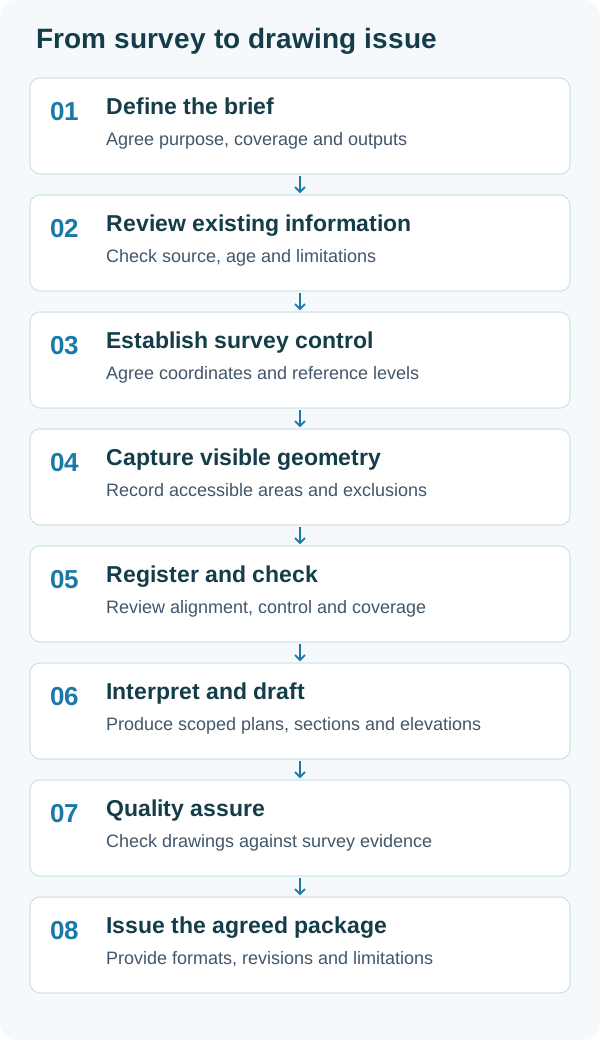
The workflow links capture, interpretation and quality assurance to the agreed drawing package.
How accurate are as-built drawings?
There is no single accuracy that applies to every as-built package.
Accuracy depends on:
- survey method and instrument performance;
- control and network geometry;
- access and line of sight;
- surface properties and site conditions;
- the distribution of scan positions;
- registration and independent checks;
- drawing scale and level of detail;
- how geometry is interpreted;
- whether critical features were specifically verified.
A general refurbishment survey does not necessarily need the same tolerance as a fabrication interface. Equally, a dense point cloud should not be assumed suitable for fabrication merely because it contains many points.
Accuracy should be discussed in relation to the intended decision.
Read Measured Survey Accuracy and Specification where available, or Terrestrial Laser Scanning Accuracy for the distinction between instrument performance and completed survey accuracy.
What cannot be confirmed from an as-built survey?
A measured survey records evidence that is visible, accessible and within scope.
It does not automatically confirm:
- concealed construction;
- foundations or below-ground elements;
- the contents of closed ducts, risers or ceiling voids;
- ownership or legal boundaries;
- structural capacity;
- material composition;
- compliance with Building Regulations;
- installation quality;
- whether fire stopping or other hidden work is complete;
- the operational performance of building services.
Some hidden information can be supplemented through opening-up, specialist investigation, utility detection, commissioning records or contractor data.
Assumptions and unmeasured areas should be identified rather than quietly drawn as fact.
Good as-built information distinguishes measured evidence, supplied information and reasonable interpretation. Poor as-built information makes them look the same.
What file formats are commonly supplied?
Not sure whether your team needs drawings, a point cloud, orthophotos or a model? Our survey deliverables guide compares the options and explains how to choose a package around the decisions your project needs to make.
For 2D drawing packages, common outputs include:
- DWG for editable CAD information;
- PDF for review, issue and controlled reference;
- DXF where specifically required for compatibility.
Supporting survey information may include:
- registered point clouds in E57 or another agreed format;
- Autodesk ReCap files;
- high-resolution survey imagery;
- orthographic imagery;
- Revit models;
- IFC exports;
- schedules or asset data.
The required formats should be agreed before production. A file being technically available does not mean it is the most useful or proportionate deliverable.
What should you specify when commissioning as-built drawings?
A clear brief should answer several practical questions.
What decisions will the drawings support?
This determines the accuracy, detail and verification effort required.
Which areas and elements are included?
State floor coverage, external areas, roofs, voids, façades, plant spaces and any service disciplines.
Which views are required?
Confirm the number and location of plans, sections and elevations rather than assuming a “full survey” means the same thing to everyone.
What detail is critical?
Identify interfaces, levels, openings, structure, equipment, service routes or heritage features that need particular attention.
What coordinate system and datum are required?
A local project grid may be entirely suitable. Some schemes need site control or an OS-related framework.
What is excluded or inaccessible?
Access restrictions should be known early so the team can plan around them or state the limitation clearly.
What outputs and issue conventions are required?
Confirm file formats, drawing scales, layer standards, title blocks, revision information and whether point-cloud or BIM data is also needed.
As-built CAD or as-built BIM?
The choice depends on how the information will be used.
CAD is often appropriate when:
- the required outputs are plans, sections and elevations;
- the team needs clear 2D information;
- the project does not require object-based coordination;
- programme and proportionality favour a focused drawing package.
BIM may be appropriate when:
- the project team is coordinating in a shared model environment;
- spatial relationships need to be explored in 3D;
- object classification or asset information is required;
- the model will support ongoing design, construction or operation.
A BIM model is not automatically more accurate than CAD. Both are interpretations of survey evidence, and both need a defined level of detail and tolerance.
See Scan to BIM for more on model scope and Scan to CAD for measured drawing production.
How Geo Scan approaches as-built surveys
Geo Scan produces measured information for architects, engineers, contractors, developers and property teams who need a dependable record of existing conditions.
Our approach is built around:
- defining the purpose before capture;
- planning access, coverage and control;
- combining 3D laser scanning with appropriate survey methods;
- checking registration and survey geometry;
- interpreting real building fabric carefully;
- producing proportionate plans, sections, elevations or models;
- identifying inaccessible and assumed information;
- quality assuring deliverables before issue.
The result is not simply a drawing of a building.
It is a controlled information package designed to support the next project decision.
Related Geo Scan services and guidance
For projects requiring measured as-built information, the following pages provide additional context:
- As-Built Surveys
- Measured Building Surveys
- Scan to CAD
- 3D Laser Scanning
- Scan to BIM
- Point Cloud Surveys
- Terrestrial Laser Scanning Accuracy
- 3D Laser Scanning for Measured Building Surveys
A reliable record starts with a clear purpose
As-built drawings are most useful when their origin, scope and limitations are understood.
A design drawing records intent.
A marked-up construction drawing records reported change.
A measured as-built drawing records observed geometry.
A coordinated record package may bring several evidence sources together.
The correct solution is therefore not to ask for “as builts” in the abstract. It is to define what needs to be known, how reliably it must be known and which deliverables will help the project team act on that information.
That clarity at the beginning produces a much more dependable record at the end.